


JetBlue
4.517.02K Reviews
App Specs
- Version
- 9.12.0
- Updated On
- License
- Free
- Downloads
- 5,000,000+
- Developer
- JetBlue Airways Corporation
- Categories
- Travel & Local
- Platform
- Android, iOS
Screenshots
 Analysis by AppCompare
When I’m planning a trip, I want the useful details close at hand without having to keep switching between a browser, an email inbox, and a stack of travel notes. That is the practical appeal of JetBlue - Book & Manage Trips: it brings the airline side of a journey onto a phone, from choosing a flight to handling the steps around departure. I find it most valuable when JetBlue is already the airline I plan to fly, rather than as a universal tool for comparing every carrier.
The app is free, made by JetBlue Airways Corporation, and sits in the travel-and-local category. It has a 4.5 average from around 98,000 ratings, with more than five million installs, which suggests it has become a familiar option for many JetBlue travelers. It is rated for everyone, and version 9.6.0 supports devices running Android 8.0 or later. Those details make it easy to try, but what matters in day-to-day use is whether the app helps the trip move smoothly from a search to a boarding pass.
Starting with the trip you actually need
I’d open the app when I have a destination and rough travel dates in mind, but still need to decide which flight works. The booking flow is designed around JetBlue’s own options, so it is a direct route to its schedules and fares rather than a broad search across airlines. That focus is useful if I have already settled on JetBlue, want to manage a TrueBlue account, or would rather keep booking and trip details in one place.
If I am still comparing airlines, I would start with a travel search service or check several carriers separately, then come back here once JetBlue is a serious choice. That is not a flaw so much as a boundary: an airline app is best at serving its own passengers. I also like having the airline’s own channel available when I need to revisit a reservation, instead of relying on a third-party itinerary view that may not cover every airline-specific step.
Your Travel Companion in Your Pocket
First things first, the app’s interface is like a breath of fresh air. It’s clean, intuitive, and super easy to navigate. From booking your next getaway to managing your travel details, everything feels like it’s placed exactly where it should be. I mean, who has time to dig through menus when you’re trying to snag a last-minute flight deal, right?
Booking Made Easy
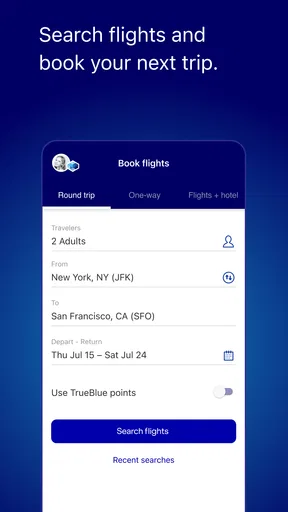
With the JetBlue - Book & Manage Trips app, booking a flight is as straightforward as it gets. You simply enter your travel dates and destination, and voilà, a list of available flights pops up. The app even lets you filter options based on price, time, or even the type of fare. And the best part? It’s all just a few taps away. No more hopping from tab to tab or dealing with slow-loading websites.
One detail I’d pay attention to is the trade-off behind a fare choice, not just its headline price or departure time. If a schedule only looks convenient before considering what the chosen fare includes, I would pause and compare the available options carefully before paying. In an airline’s own app, that comparison is specific to that airline; it won’t tell me whether another carrier has a better overall itinerary. I treat it as the place to make an informed JetBlue booking, not as proof that JetBlue is the best fit for every journey.
Worth Reading Before You Choose

EA SPORTS FC Mobile 26 Is a Bigger Football Game, but It Takes Time

Flipboard Shows What News Apps Must Do Beyond the Feed

Switching to Android Auto Means Rethinking Your Driving Routine

Google Calendar Makes a Crowded Week Easier to Manage

Ludo King Makes the Most of the Minutes Between Plans

Baby Panda World Brings Quick Play to Modern Phones, but Its Game Library Feels Busy
From booking to a usable itinerary
After booking, I would make the itinerary my reference point and check that the dates, route, and passenger details match what I intended. That small review is worth doing before travel day, when correcting a simple oversight is less stressful than trying to sort it out while leaving for the airport. If other people are traveling with me, I would also make sure everyone knows where the current trip information lives rather than assuming a screenshot or forwarded email will stay current.
A realistic use case is a short work trip planned between other commitments. I can search for a flight during a break, choose a departure that fits the schedule, and later return to the same app to check the trip and prepare for check-in. Keeping those steps together reduces the chance that I am searching through old messages at the curb. For a family trip, I would do the same review earlier, because choices such as seating and the needs of a pet or extra baggage are easier to think through before everyone is packing.
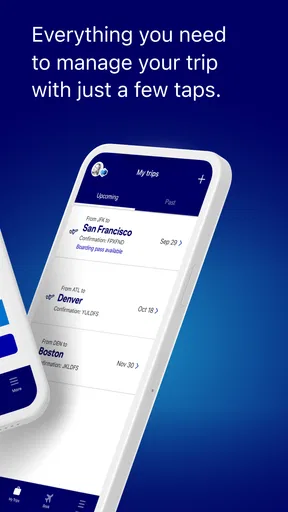
Manage Your Trips with a Swipe
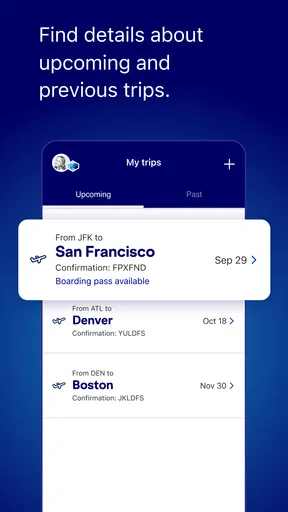
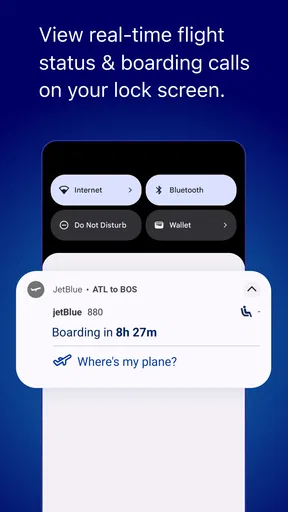
Once your flight is booked, managing your itinerary is a breeze. The app allows you to view your upcoming trips, make changes if necessary, and even add special services like extra baggage or pet travel. It’s like having a personal travel assistant you can carry around in your pocket. Plus, the notifications keep you in the loop with any changes to your flight status or gate information.
Notifications are most helpful as a prompt, not as a substitute for checking the trip yourself. Before heading to the airport, I would open the itinerary and confirm the latest details, especially if the day has been busy or plans have changed. A gate update can be useful, but the handoff still involves airport signs and announcements, so I would keep checking those too. On a phone, alerts can also be missed if they are muted or overlooked; I would not build a tight connection or rushed departure around the assumption that one notification will solve every timing problem.
Preparing for the airport without extra scrambling
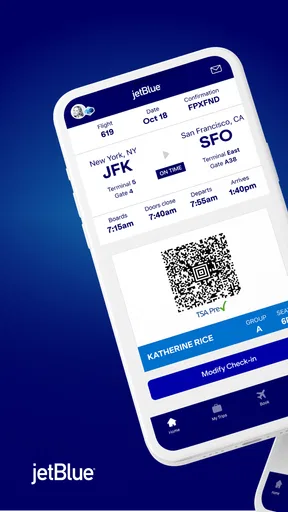
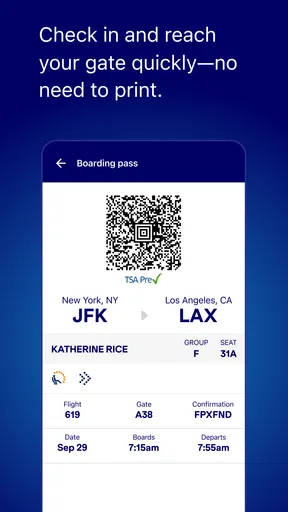
Check-in and a mobile boarding pass can make the airport routine simpler, particularly when I am traveling with only what I can manage easily and want to avoid searching for a paper document. I would complete the app’s check-in step when it is available for my trip, then make sure I can bring up the pass before leaving home. If my phone battery is low, I would charge it or keep another practical way to access my travel information; a digital pass is convenient, but it depends on having a working phone at the moment I need it.
Seat selection is another step I would handle with a little care. If sitting together matters, I would check the seating arrangement rather than assuming the booking process has placed everyone as hoped. The app can make the airline’s seat-selection step easier to reach, but a phone interface does not remove the need to review what is actually selected. I would also check any extra-service choices I made, such as baggage or pet travel, against my plans before departure so that the itinerary reflects what I expect to bring.
JetBlue Perks at Your Fingertips
The app doesn’t just stop at managing flights. It’s packed with features that enhance your travel experience. You can check in for your flight, select your seat, and download your boarding pass directly to your phone. I found this particularly handy, especially when dashing through security. No more fumbling around for paper tickets.
And let’s not forget about TrueBlue, JetBlue’s loyalty program. The app integrates seamlessly, allowing you to view and manage your points, redeem rewards, and keep track of your progress towards that next free flight.
For someone who flies JetBlue occasionally, this loyalty view can be a useful nudge to check whether points or rewards affect a booking decision. I would still compare the actual trip options with my needs instead of choosing a flight only because I want to use points. Regular JetBlue customers are more likely to benefit from having those account details beside their trips; a traveler who rarely flies the airline may find that part less important and can focus on booking and check-in.
Handing off from phone to plane
Once I reach the airport, the app becomes one part of a larger travel routine. I use it for the itinerary and boarding pass, but I still follow airport staff, posted signs, and the information presented at the airport. That division matters: the phone is handy for keeping the airline’s trip details accessible, while the airport is where I confirm the practical next step in the moment. I would avoid treating an app screen as a reason to stop paying attention to changes around me.
The same thinking applies on board. The app can point travelers toward JetBlue’s entertainment and Fly-Fi information, but using those services is a separate part of the flight experience. I would check the relevant details in the app before relying on connectivity for work or entertainment, and bring an offline option if a particular movie, document, or task is essential. That is a sensible backup for any flight, not a criticism of the app: the phone can help me prepare, but it cannot guarantee that every onboard need will be met exactly as planned.
In-flight Entertainment and More
Even when you’re 30,000 feet in the air, the app has you covered. You can access JetBlue’s in-flight entertainment lineup, which includes movies, TV shows, and more. And if you’re like me, who loves staying connected, the app provides information on the Fly-Fi service, JetBlue’s onboard Wi-Fi, which is a real lifesaver for those long-haul flights.
Compared with a general travel app, this one is narrower but closer to the airline-specific tasks that matter after booking: checking in, viewing a trip, and keeping JetBlue information together. Compared with managing everything through a browser, I prefer having a dedicated place on my phone when I am already traveling with JetBlue. A travel aggregator may be a better starting point for comparing carriers or assembling a multi-airline journey, while this app makes more sense as the companion for the JetBlue portion. I would not expect one airline app to replace a broader planning tool.
When plans change, and where the flow can break
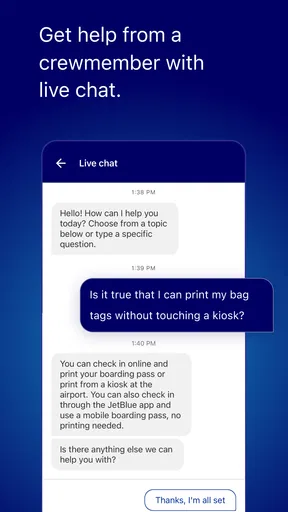
Travel plans do not always follow the original itinerary, so I value having a route back to the airline when I need help. The app offers customer-service contact options, including chat and calling, which can make it easier to start a conversation without hunting through unrelated pages. I would keep the booking details handy and explain the specific issue clearly; a direct contact option helps with the handoff, but it does not mean every question will be resolved instantly or that a change will always be simple.
The main friction is the same focus that makes the app useful: it is built around JetBlue. If my plans involve several airlines, separate bookings, or a broad search for the cheapest overall route, I would need another tool alongside it. A small phone screen can also make it harder to compare details than a larger display, so I would use a browser or computer if I wanted to examine several complex options side by side. And while alerts can help me stay aware, I would still check the trip directly before an important airport transfer or departure.
If I am deciding whether to install it, the key question is whether JetBlue is part of my travel plans. Frequent customers get the clearest value from having bookings, check-in, TrueBlue, and flight information close together. An occasional passenger can still use it for a single trip, but someone who never flies JetBlue or wants one app to manage every airline should look elsewhere or use it only for the JetBlue booking. I would also make sure my device meets the Android minimum before depending on it for travel; the app is available on iOS as well, so Apple users can use the airline’s mobile option too.
Customer Service at Your Beck and Call
Another nifty feature is the direct line to JetBlue’s customer service. Whether you need to change a booking or have a question about your flight, help is just a tap away. The app provides multiple contact options, including chat and call, ensuring you’re never left hanging.
My practical advice is to use the app as the central place for the JetBlue parts of a trip, while keeping a simple backup for essentials such as the itinerary and travel documents. Before leaving, I would check the booking, confirm the boarding pass is accessible, and make sure my phone is ready for the journey. That preparation makes the handoff from planning at home to moving through the airport feel less fragmented, without asking the app to replace the rest of the travel routine.
Wrapping it Up
All in all, the JetBlue - Book & Manage Trips app is a must-have for any traveler looking to streamline their travel experience. With its user-friendly interface, comprehensive features, and the convenience it offers, it’s hard not to fall in love with it. So, next time you’re planning a trip, give it a whirl and see how it transforms your travel game. Safe travels!
My recommendation is more specific: I would install it when I have a JetBlue trip to book or manage, especially if I value keeping check-in and loyalty details near the itinerary. I would pair it with a broader comparison tool when choosing among airlines, and I would still verify important travel details as departure approaches. Used with those expectations, it is a practical airline companion rather than an all-purpose travel planner, and that is exactly where I think it earns its place on my phone.
Pros
- User-friendly interface for easy navigation.
- Real-time flight updates and notifications.
- Seamless mobile check-in feature.
- Access to in-flight entertainment options.
- Efficient booking and management of trips.
Cons
- Occasional app crashes reported by users.
- Limited payment options for bookings.
- Inconsistent performance on older devices.
- Some features require stable internet access.
- Customer support response can be slow.
FAQs for JetBlue
What features does the JetBlue app offer for managing my trips?
The JetBlue app provides a comprehensive suite of features to streamline your travel experience. You can book flights, manage existing reservations, check flight status, and access your boarding pass. Additionally, it offers options for seat selection, upgrades, and provides real-time updates and notifications about your flights.
How user-friendly is the JetBlue app for booking flights?
The JetBlue app is designed with user-friendliness in mind, offering an intuitive interface that simplifies the booking process. With easy navigation, you can search for flights by destination and date, compare fares, and complete your booking in a few straightforward steps. The app also saves your preferences for future bookings.
Can I use the JetBlue app to check in for my flight?
Yes, you can conveniently check in for your flight using the JetBlue app. The app allows you to check in up to 24 hours before your flight’s departure. Once checked in, you can access your mobile boarding pass directly from the app, making the airport experience more seamless and paperless.
Does the JetBlue app provide any special offers or promotions?
The JetBlue app frequently updates users with the latest promotions and special offers. By enabling notifications, you can stay informed about discounted fares, vacation packages, and exclusive deals available only to app users. It’s a great way to maximize savings on your travel plans.
Is there customer support available through the JetBlue app?
Yes, the JetBlue app includes a customer support feature, allowing you to reach out for assistance directly from the app. Whether you need help with booking, changing a reservation, or any other inquiry, you can access support via live chat or by contacting customer service, ensuring a smooth travel experience.


